
Exam FAQs
Find Answers to Your Questions
We understand that being prepared for an exam is critical to your success. We’ve tried our best to anticipate your questions and provide the answers you need in planning and taking an exam.
- Advanced Concepts and Case Studies
- Advanced Income Capitalization
- Advanced Market Analysis and Highest and Best Use
- Advanced Residential Applications and Case Studies/Part 1
- Advanced Residential Report Writing/Part 2
- Advanced Spreadsheet Modeling for Valuation Applications
- Application and Interpretation of Simple Linear Regression
- Appraisal of Manufactured Homes
- Basic Appraisal Principles
- Basic Appraisal Procedures
- Case Studies in Appraising Green Residential Buildings
- Condemnation Appraising: Principles and Applications
- Fundamentals of Separating Real Property, Personal Property, and Intangible Business Assets
- General Appraiser Income Approach/Part 1
- General Appraiser Income Approach/Part 2
- General Appraiser Market Analysis and Highest and Best Use
- General Appraiser Sales Comparison Approach
- General Appraiser Site Valuation and Cost Approach
- International Financial Reporting Standards
- Introduction to Green Buildings: Principles & Concepts
- Litigation Appraising: Specialized Topics and Applications
- National Uniform Standards of Professional Appraisal Practice (USPAP) Course, 15-Hour
- Practical Applications in Appraising Green Commercial Properties
- Quantitative Analysis
- Real Estate Finance, Statistics, and Valuation Modeling
- Residential and Commercial Valuation of Solar
- Residential Market Analysis and Highest & Best Use
- Residential Report Writing and Case Studies
- Residential Sales Comparison and Income Approaches
- Residential Site Valuation and Cost Approach
- Review Case Studies-General
- Review Case Studies-Residential
- Review Theory-General
- Review Theory-Residential
- Supervisory Appraiser/Trainee Appraiser Course
- The Appraiser as an Expert Witness: Preparation and Testimony
- Uniform Appraisal Standards for Federal Land Acquisitions: Practical Applications
- Valuation Bias and Fair Housing Laws and Regulations
- General Appraiser Report Writing and Case Studies
If you are a student taking an exam for any National Sync course, yes—100% attendance is required in order to schedule and sit for the corresponding exam. Please note: MAI designation-seeking candidates may apply for a Challenge Exam instead.
There are no scheduled breaks. AI exams are one, two, or three hours long. Classroom and Pearson VUE testing center: You may leave the exam room to use the washroom, but you may not take anything with you and the exam time will NOT be paused.
Pearson OnVUE online testing: There are no scheduled breaks; leaving the view of the webcam for any reason will result in your exam session being terminated and any exam results being invalidated. If not having a break is an issue for you, we suggest scheduling an exam at a Pearson VUE testing center.
Yes, you may retake the exam if you do not pass. After your attempt, you will receive an exam critique outlining the specific content areas that require additional study, along with detailed instructions on how to schedule your retake.
Retake fees are based on membership status:
- $125 for AI Designated Members, Candidates for Designation, Associate Members, and Affiliate Members
- $165 for nonmembers
You may retake the exam up to two times within one year from the date you completed the course.
Important Note: Certain states may have specific re-exam requirements. Such states include GA and FL. For students licensed in these states, one exam retake only is permitted. For students licensed in FL, the student must wait at least 30 days from the date of the original exam before a second attempt is made. For both GA/FL, if the first and second exam attempt are failed, the student must repeat all in-class instruction before testing again.
Individuals can earn designation credit for most courses by challenging the course examination and receiving a passing grade.
Click here to register for a Challenge Exam:
- Review the Challenge Exam Policy and click “Challenge An Exam”
- All eligible challenge exams will appear.
- Click “Register” next to your selected exam to complete your purchase.
Once registered, you will have one year from the purchase date to schedule and take the exam.
To schedule your exam, visit the Pearson VUE – Appraisal Institute Educational Examinations website:
https://home.pearsonvue.com/ai
If you do not already have a Pearson VUE account:
- Create an account using the same email address you used to register.
- Have your AI account number available during setup.
After signing in, select how you would like to take your exam:
- At a local test center, or
- Online through OnVUE (home or office).
Important: Challenge Exams provide AI credit only and may not be used for state credit.
Log onto your AI Account page and click on “Education and Events” located on the right navigation menu. From your “My Events” page, scroll down to the Exams section and click on the View button located to the right of the course challenge exam. Scroll down to the Download Course Materials section and click on the individual links to download the course materials.
You can enlarge an exhibit for easier viewing by pressing the CTRL and + buttons simultaneously on a PC, or Command and + on a Mac. Each time this shortcut is invoked, the zoom increases 25%. The converse also is true: Hit CTRL and – on a PC or Command and – on a Mac to decrease the zoom by 25% each time the command is invoked.
Please contact our Education Delivery department at 312-335-4207 or contact Customer Service.
You may use a headset to communicate with the proctor during exam check-in. However, you may NOT use the headset during the exam; you’ll need to unplug it and remove it from your desk for the duration of the exam.
If you read the course materials, ask questions by email if you are not certain, and faithfully complete all quizzes and assignments, you will be in great shape for the exam. The course materials tell you about the number of exam questions, topics covered, and approximate percentage of the exam devoted to each course topic. There is also a document outlining general study strategies that will assist you in taking any exam. You can print out the course materials to study for the exam. You have access to the course materials and printing until the official end date of the session. Note. You cannot print out the materials for the 15 Hour National USPAP course.
- Limit household internet connections while testing. All household internet connections compete for bandwidth, including online gaming, streaming services, online learning, etc.
- Use a wired internet connection. Direct wire connections provide better connectivity than wi-fi. While wi-fi can be used, it is not as reliable as a wired internet connection direct to your computer.
- Ensure your computer meets or exceeds the system requirements and run a system check on the computer you plan to use to take the exam. This will indicate how your system will perform during the exam.
- Perform a system check by downloading the OnVUE online proctoring software and testing compatibility at https://home.pearsonvue.com/Test-takers/Resources.aspx#system-test.
- Check system requirements (i.e., functioning computer that meets or exceeds requirements, webcam, strong internet connection, etc.) at https://home.pearsonvue.com/op/OnVUE-technical-requirements.
- Use Chrome, the recommended browser, not Internet Explorer which is NOT supported.
Yes. However, you may NOT use a separate monitor. Be sure that your laptop screen size and clarity is sufficient for the exam.
Unless otherwise noted in the course material, you usually don't have to memorize symbols and formulas because they are provided within the exam.
If you need to silence your phone after the exam has begun, alert a proctor, then wait for their acknowledgement to ensure they understand you are accessing your phone only to silence any notifications. Once you have silenced your phone, move it back to a place where you won’t have immediate access to it.
No. You may not make outbound calls for any reason. To reach Pearson VUE support, please use the chat feature on your program page: https://home.pearsonvue.com/Test-takers/OnVUE-online-proctoring/View-all.aspx.
Cell phone use is permitted ONLY while checking in for your exam and/or if you experience a technical issue. During the exam, if you take a call, have a conversation with a third party who is not a Pearson VUE proctor, text, access apps, etc., your exam may be revoked/terminated.
Pearson VUE will not text you during your exam. If you receive a text notification, ignore it and continue testing.
No. They must be silenced and stored out of reach for the duration of the exam.
If your phone rings during your exam, only look to see who is calling. If a proctor is contacting you, the OnVUE number will always show as 617-379-0635 and/or caller ID may identify the number as Pearson VUE. If this number or contact appears, please answer the call, as a proctor may be trying to reach you.
Any mobile phone use other than engaging with a proctor is strictly prohibited and will result in your exam being revoked. If your phone rings and the call is not from a Pearson VUE proctor, do not answer it.
You may keep your phone in the room where you are testing, but it may not be kept in your immediate testing workspace. If you need to access your phone during the exam you may reach for it, but do not entirely leave the webcam’s view. The proctor must be able to see you access the phone.
No. Only one functioning monitor is permitted. If you have more than one monitor on your desktop during exam check-in, the proctor will ask you to unplug the secondary monitor and power source.
Here is a video from a student who took an OnVUE online exam: https://www.youtube.com/watch?v=j2E7w_EMUGw. Also, for more detailed FAQs, see: https://home.pearsonvue.com/Test-takers/Resources.aspx.
Course exams are multiple choice.
AI requires 70% to pass the exam. The exam passing score for the 15-Hour USPAP Course is established by The Appraisal Foundation and may vary by USPAP cycle. Additionally, minimum passing score requirements for all course exams may vary by state.
Please refer to PearsonVUE resources and policies here or contact Customer Service.
If you took an exam through Pearson VUE (at a testing center or through OnVUE online testing):
- Exam results will be available on business days within 24 hours of completing the exam.
- Log into the AI website and from your My AI Account page, click Education and Events in the menu on the right.
- On the My Events page, scroll down to the Exams section and click on the View button next to the program.
If you took an exam in the classroom:
- Exam results will be available for students to download within 5 – 7 business days from the date of receipt by the central office.
- Log into the Appraisal Institute website and from your My AI Account page, click Education and Events in the menu on the right.
- On the My Events page, scroll down to the Exams section and click on the View button next to the program.
If you did not pass your exam and are still within your eligibility period, you may register for a re-exam by following these steps:
Step 1: Confirm Eligibility
You may retake an exam up to two additional times (three total attempts).
All attempts must be completed within:
- One year from your course completion date (for Classroom, Online, and Synchronous courses), or
- One year from the Challenge Exam purchase date (for Challenge Exams).
If your eligibility period has expired or you have used all three attempts, you must retake the course before testing again.
Step 2: Purchase the Re-Exam
- Sign in to your AI account.
- Click “Education and Events” in the right navigation menu.
- Locate your course or Challenge Exam and click “View.”
- If you are eligible, you will see the “Purchase Re-Exam” button.
- Complete the re-exam purchase.
Once your re-exam fee has been paid, your authorization will be sent to Pearson VUE. Please allow 24–48 hours for processing before scheduling your exam.
Important Note: Certain states may have specific re-exam requirements.
Step 3: Schedule Your Exam
Visit the Pearson VUE – Appraisal Institute Educational Examinations website:
https://home.pearsonvue.com/ai
If you do not already have a Pearson VUE account:
- Create one using the same email address associated with your AI account.
- Have your AI account number available during setup.
After signing in, select how you would like to take your exam:
- At a Pearson VUE test center, or
- Online through OnVUE (home or office).
Yes. Rescheduling policies vary depending on whether you are testing at a Pearson VUE Testing Center, online through OnVUE, or changing your exam delivery method.
All rescheduling must occur within your one-year eligibility period (one year from course completion date or one year from Challenge Exam purchase date).
Pearson VUE Testing Center Exams
- You must notify Pearson VUE at least 24 hours in advance if you are unable to attend your scheduled exam.
- Changes or cancellations made less than 24 hours before your appointment will be recorded as a No-Show.
If you are marked as a No-Show:
- You must purchase a $95 Re-Submit through your AI student portal.
- A new exam authorization will be issued within 24–48 hours.
- Once authorized, you may log in to Pearson VUE to schedule a new appointment.
OnVUE Online Exams
- You may reschedule your exam one time at no charge directly through Pearson VUE, up to your scheduled exam start time.
- A second reschedule (or additional changes) will require a $95 fee per change.
If rescheduling more than once:
- You must purchase a $95 Re-Submit through your AI student portal.
- A new exam authorization will be issued within 24–48 hours.
- You may then schedule your new appointment through Pearson VUE.
Changing Delivery Method (Testing Center ↔ OnVUE)
If you wish to change how you take your exam (from Testing Center to OnVUE, or vice versa):
- You must first cancel your existing appointment.
- The change must be made through Pearson VUE at least 48 hours prior to your scheduled exam time.
- Changing delivery methods counts as a reschedule.
Fees apply as follows:
- One change is permitted at no charge.
- Additional changes require a $95 Re-Submit fee per change through your AI student portal before rescheduling with Pearson VUE.
Important: All rescheduling must occur within your one-year eligibility period (one year from course completion date, or one year from Challenge Exam purchase date).
No-Show consequences:
- Purchase a $95 Re-Submit through your AI student portal.
- A new authorization is issued within 24–48 hours.
- Schedule a new appointment via Pearson VUE (within eligibility period).
- For all numerical problems, intermediate calculations are held internally in the calculator or software through problem completion, with rounding occurring only at the end. To get the same answer as shown in the course handbook and the exam, do not re-input any intermediate number. Rely on your calculator’s stack or storage registers to hold the number to the maximum digits allowed. If using an electronic spreadsheet, copy and paste the cell reference or contents.
- Occasionally materials will display intermediate results on a rounded basis for ease in instruction. However, calculations relying on those numbers will use the unrounded equivalents until problem completion. For example, while the handbook may show a number such as $135.67, the number that is actually stored in the calculator or Excel is $135.66666… So, a rounded number is shown, but more decimals are stored. Note. Use of intermediate numbers as inputs in calculations may produce results that differ slightly from those shown due to the adopted rounding convention.
- The exam will not require a choice between two answers that differ only by a rounding decision.
- Term calculations. When using Excel or similar software, or a calculator other than the HP-12C, a problem that solves for term may result in a fractional answer instead of the whole number that the HP-12C always shows. The HP-12C rounds a fractional period to the next whole period to reflect the day the final payment is due; the others offer the advantage of alerting the user to the fact that the last payment is not equal to the others. If a problem such as this appears on the exam, the question will not require a choice between the HP-12C rounded solution and the fractional result as the correct answer.
The exam must be scheduled within 60 days and taken within 90 days of completing an online or synchronous course. If you do not schedule and complete your first exam attempt within the 90-day eligibility period, your exam authorization will expire. To receive a new exam authorization, you must purchase a $95 resubmission. Once the resubmission fee has been processed, a new authorization will be sent to Pearson VUE.
Go to the Pearson VUE - Appraisal Institute Educational Examinations website at https://home.pearsonvue.com/ai. If you have not done so already, create a Pearson Vue account. Use the same email address you used to register for the course, as well as your AI account number. After signing in with your Pearson VUE credentials, select how you wish to take the exam: At a local test center.
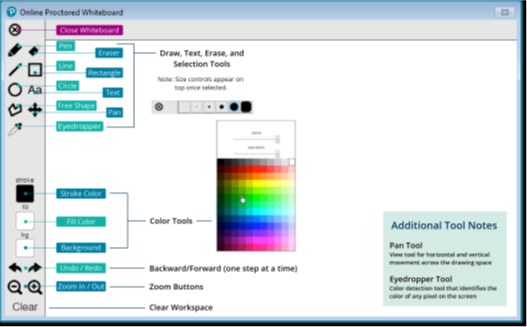
An online whiteboard feature is available during the exam that allows you to enter notes or draw shapes. It is available anytime during the exam by clicking the eraser icon at the top of the screen. You may erase the working space at any time to start something new. Below is a sample:
No, you may only bring a cleared calculator. At a Pearson VUE testing center, you’ll receive an erasable, laminated note board and pen to write notes. You can turn in the note board for a clean one at any time throughout the exam.
You may write on your paper exam. Your exam must be turned in to the proctor at the end of the exam.
Yes. You’ll schedule the exam the same way that you schedule an exam at the testing center. Go to the Pearson VUE - Appraisal Institute Educational Examinations website at https://home.pearsonvue.com/ai. If you have not done so already, create a Pearson Vue account. Use the same email address you used to register for the course, as well as your AI account number. After signing in with your Pearson VUE credentials, select how you wish to take the exam: At a home or office.
Before the day of the exam:
- Make sure you have a functioning home computer with a webcam and strong internet connection.
- Run a system check to test the compatibility of the OnVUE application.
- Make sure your space will be free from noise or distractions including roommates and pets.
- Clear the room of any preparation materials or unauthorized items to avoid exam violations.
On exam day:
- IMPORTANT. Begin the check-in process 30 minutes BEFORE your scheduled exam time. While these tasks are easy, they can take up to 30 minutes to complete.
- You’ll take photos of your government-issued ID and your testing environment, as well as a headshot.
- After your photos are reviewed, your exam will be queued up. Most of the time, you’ll start your exam within 15 minutes of your appointment time.
- If your pictures don’t pass review, a greeter will join you as soon as possible to help you troubleshoot.
- You will be monitored by a VUE-certified proctor via webcam and microphone throughout your test to ensure the integrity and security of your exam experience.
Before the day of the exam:
- Make sure you have a functioning home computer with a webcam and strong internet connection.
- Run a system check to test the compatibility of the OnVUE application.
- Make sure your space will be free from noise or distractions including roommates and pets.
- Clear the room of any preparation materials or unauthorized items to avoid exam violations.
On exam day:
- IMPORTANT. Begin the check-in process 30 minutes BEFORE your scheduled exam time. While these tasks are easy, they can take up to 30 minutes to complete.
- You’ll take photos of your government-issued ID and your testing environment, as well as a headshot.
- After your photos are reviewed, your exam will be queued up. Most of the time, you’ll start your exam within 15 minutes of your appointment time.
- If your pictures don’t pass review, a greeter will join you as soon as possible to help you troubleshoot.
- You will be monitored by a VUE-certified proctor via webcam and microphone throughout your test to ensure the integrity and security of your exam experience.
You are required to complete and pass the exam if you are taking a course to meet requirements for
- State qualifying education
- Qualifying education for an Appraisal Institute designation
- Professional development program registries
- State continuing education. While most states do not require an exam for CE credit, please confirm this with your state licensing board.
We encourage you to take and pass the course exam to receive the most AI CE points. However, the exam is optional.
You will not receive a separate authorization email.
After successfully completing all required course content and assignments, your exam authorization will be transmitted to Pearson VUE within one business day.
Once that time has passed, you may log in to your Pearson VUE account to schedule your exam appointment.
Important:
You must take your first exam attempt within 90 days of your course completion date, and all exam attempts must be completed within one year of your course completion date.
All exams are proctored, regardless of the location. Exams are taken in the classroom, testing center, or online at home or work:
- Classroom. If you’re taking a course in the classroom, the exam is taken at the conclusion of the course.
Pearson VUE testing center. To find a testing center location in your area, see https://home.pearsonvue.com/ai, click on Find a test center, and type in your location.
- Home or work. Many exams may be taken from your home or office via Pearson OnVUE online testing.
You may take one financial calculator into the exam. The memory banks must be cleared beforehand. You may use: HP 10b, HP 10bii, HP 12c, HP 17bii, HP 17ii+, HP 19bii calculators or Texas Instruments (TI) BA II PLUS. No other calculators are permitted. We recommend the HP 12c. While other allowed calculators may be used during the exam, our course materials and instructors only refer to the HP 12c.
Qualifying education courses, designation courses, professional development program courses, and the 15-Hour USPAP course all have exams. Courses that are 30 or more hours have 30-75 questions and you have 2-3 hours to complete the exam. Courses that are 7-15 hours have 18-30 questions and you have 1 hour to complete the exam. The 15-Hour National USPAP Course has 50 questions, and you have 1 hour to complete the exam.
No, you will not receive a letter grade or percentage. You only will receive a pass or fail notice.

Still have questions?
Didn’t find what you are looking for? Our service center is here to help you.